Every job scored to your résumé —
a tailored one for each.
One feed across company boards and LinkedIn, Indeed & Glassdoor. Every job scored 0–100 against your résumé — with a tailored, ATS-clean résumé ready to export for each one. The parts LinkedIn, Teal and Jobscan split across three paid tools — in one, free.
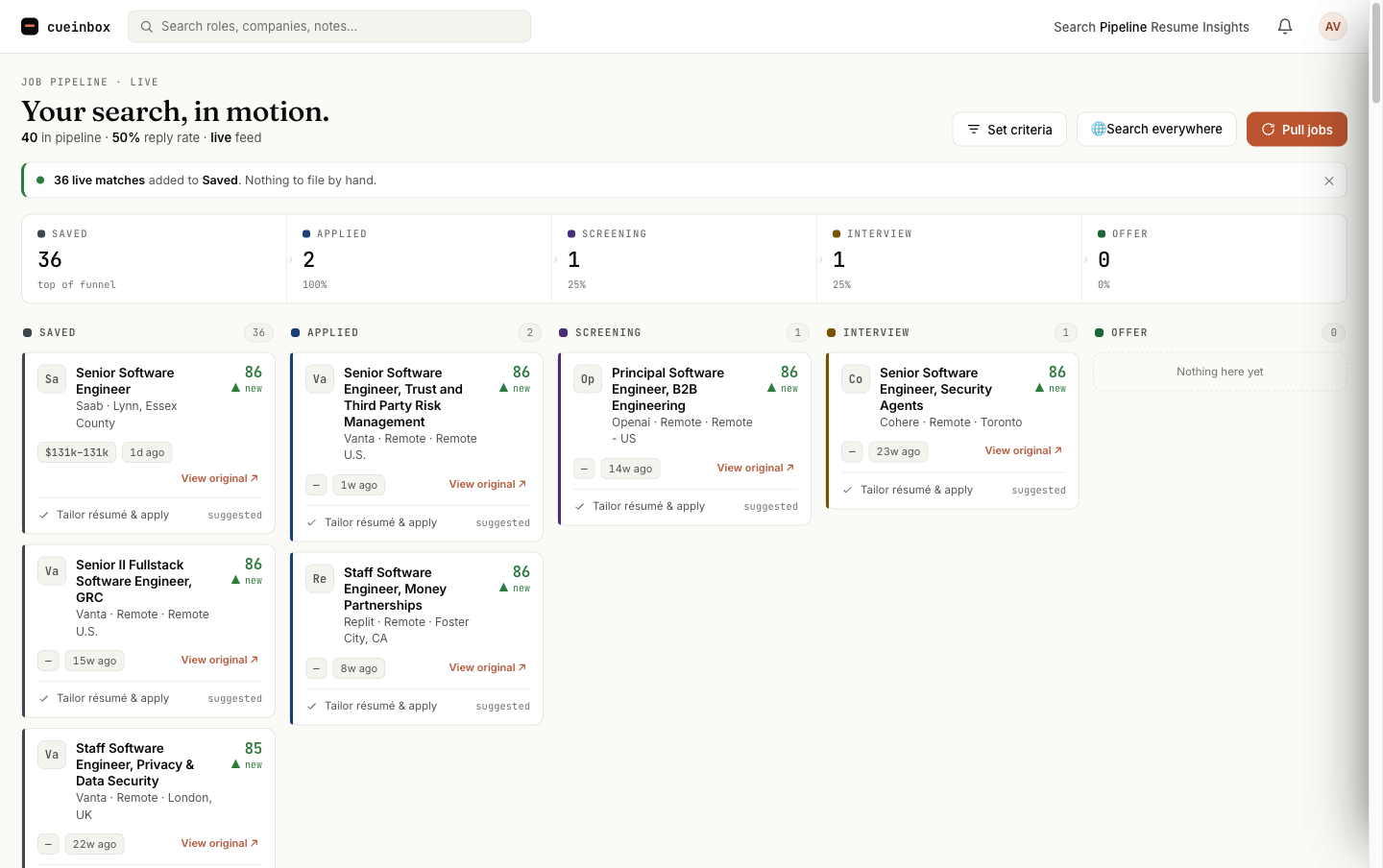
Your whole search, scored and on one board.
Not a mockup — this is the live product. Every card carries a 0–100 match against your résumé, ranked and ready to tailor.
Three steps, then it works for you.
Bring your résumé once. CueInbox handles the discovery, scoring, and tailoring so you spend your time only on the applications worth it.
Upload your résumé & set your search
Parsed once to learn your skills and seniority. Set your roles, locations, salary and seniority, and live listings start flowing from dozens of boards, company career pages — and LinkedIn, Indeed & Glassdoor. Or paste any job link.
Every job gets a match
A 0–100 score lands on each posting the moment it's pulled, broken down by skills, experience, domain fit and seniority — triage in seconds instead of reading every description.
A tailored résumé, then apply
Generate a complete, ATS-clean résumé rewritten for each job, edit the working copy, and export the PDF. Track every application on one board — drag a card and your funnel updates itself. New matches arrive daily by email.
Top roles hiring right now.
The highest-paying openings on CueInbox this hour, ranked by salary. Browse thousands more by role and location — every one scored against your résumé once you sign up.
See the score before you read the posting.
Triage in seconds, not by reading every JD. Each job carries a live 0–100 match against your résumé, broken down by skills, experience, domain fit, and seniority.
- Scored the instant a job is pulled — nothing to run by hand
- Section-by-section breakdown, not a black-box number
- Sort your whole feed by fit and start at the top
A tailored résumé for every job — export in a click.
Not just tips. CueInbox generates a complete, ATS-clean résumé rewritten for each role, grounded only in your real experience — never invented. Edit the working copy with a live preview, then export a clean PDF. Per-line diffs stay reversible.
- Full tailored résumé per job, not a list of suggestions
- Editable working copy with side-by-side PDF preview
- One-click ATS-clean PDF export
- Never-invent contract — no fake titles, dates, or metrics
Your whole search on one board.
Saved → Applied → Screening → Interview → Offer. Drag a card between columns and your reply-rate and conversion update themselves — no spreadsheet at 11pm. And new matches come to you: a daily email digest plus an in-app bell the moment they're found.
- Drag-and-drop board; funnel counts double as filters
- Reply-rate & conversion, no separate analytics tab
- Daily email digest + in-app alerts for new matches
Score your résumé against a real role, right now.
This is the real engine — the same one that scores every job on your board. Edit either box and re-run. Nothing is saved.
LinkedIn finds jobs. Jobscan tailors résumés. CueInbox does both — free.
Today you juggle a job board for discovery, a tailoring tool like Teal or Jobscan (paywalled per résumé), and a tracker for the pipeline. CueInbox is all three in one — and it works before you pay.
| LinkedIn / Indeed | Teal / Jobscan | CueInbox | |
|---|---|---|---|
| Discover jobs | Yes — but siloed | No | Boards + LinkedIn/Indeed/Glassdoor, one feed |
| Scored to your résumé | Basic keyword match | Per-résumé scan (paid) | 0–100 on every job, 4-section breakdown |
| Tailored résumé + PDF | No | Paywalled, per résumé | Full tailored résumé per job, free PDF export |
| Pipeline tracking | No | Add-on / separate | Built-in kanban + conversion analytics |
| Price to actually use | Free-ish, upsells | Paywall mid-flow | Free during early access, no card |
Free to run a real search.
- One feed: boards + LinkedIn, Indeed & Glassdoor
- 0–100 match scoring on every job
- Full tailored résumé per job + ATS-clean PDF export
- Kanban pipeline, conversion analytics, daily digest
- No credit card, no mid-application paywall
Questions, answered.
Is my résumé data safe?
Does CueInbox apply or post on my behalf?
What does "never invents" actually mean?
Where do the jobs come from?
How do I hear about new matches?
What happens after I reach an offer?
Can I export my data?
Do I need a password?
Discover, score, tailor and track —
all in one place, free.
Free to actually use — not free-to-look-at. Start your search in one click.
Start free — no card